Time Blocking Template: 4 Simple Weekly Layouts
Most time blocking templates are built for someone whose calendar belongs to them.
Yours doesn’t. A client emails at 10:40 and expects an answer by lunch. A call runs twenty minutes over. Something breaks on a Tuesday. By Wednesday the neat colour-coded grid you set up on Sunday looks like a joke, and you go back to working off a to-do list and a vague sense of panic.
That is not a discipline problem. It is a time blocking template problem. A plan that only works on an uninterrupted week is not a plan, it is a wish.
Below are four time blocking template layouts built the other way round — designed on the assumption that the week will get interrupted. Copy whichever one matches how your work actually arrives.
What a time blocking template actually is
A time blocking template is a reusable weekly layout that assigns every working hour to a named category of work before the week starts, rather than to a specific task.
That distinction is the whole thing, and most people get it backwards.
A schedule says “Tuesday 9am: finish the Henderson deck.” A time blocking template says “Tuesday 9am–12pm: deep work.” The first one breaks the moment Henderson postpones. The second one survives, because the block is about the kind of attention, not the specific job.
You build the layout once. Each Sunday you spend ten minutes dropping actual tasks into blocks that already exist.
Why most time blocking templates fail
Three reasons, and they are all the same reason wearing different clothes.
They are planned at 100% capacity. Eight hours in the day, eight hours of blocks. The first overrun eats into the next block, which eats into the one after, and by 3pm everything is wrong. A template with no slack cannot absorb a normal day.
They ignore where the interruptions come from. If 80% of your interruptions are client emails, and your template has no email block, you will answer them inside your deep work block, which is the most expensive hour you own.
They are too detailed to re-use. If the template names specific projects, you rebuild it from scratch every week, and a thing you have to rebuild weekly gets abandoned by week three.
There is also a cost most people underestimate. The American Psychological Association’s write-up on task switching quotes psychologist David Meyer saying that brief mental blocks from shifting between tasks can cost as much as 40 percent of someone’s productive time. “As much as” is doing work in that sentence — it is a ceiling, not an average — but the direction is not in dispute. Switching is expensive, and a template that has you switching every twenty minutes is not saving you anything.
Time blocking template 1: the two-block day
The simplest one, and the right starting point for most people.
Split the day in half. One half is protected. One half is open.
- 09:00–12:30 — Deep block. One project. No email, no phone, no Slack.
- 12:30–13:30 — Break. Actually leave the desk.
- 13:30–17:00 — Open block. Calls, email, admin, small tasks, the client who needed something by lunch.
Three blocks, same every day.
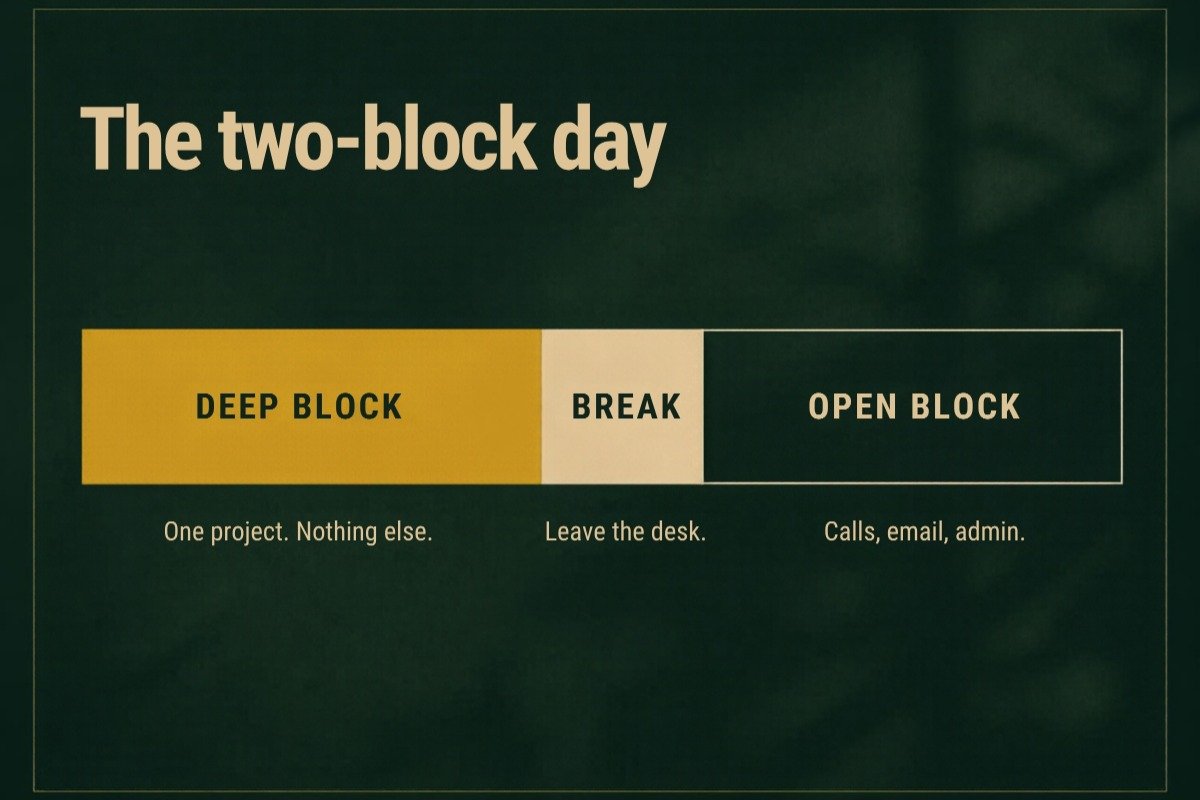
It works because it gives interruptions somewhere legitimate to live. You are not refusing to be responsive — you are being responsive between 13:30 and 17:00, which is a completely normal turnaround for almost every client who has ever existed.
Use this if: you are mostly solo, your work has long concentration tasks, and your clients are not genuinely urgent.
Layout 2: The theme week
Instead of splitting each day, you give each day a job.
- Monday — Admin and planning. Invoices, scheduling, inbox to zero, the week’s plan.
- Tuesday — Deep work. No calls booked. None.
- Wednesday — Client day. Every call stacked here.
- Thursday — Deep work.
- Friday — Finishing and sending. Deliver, follow up, close the week.
The win here is enormous and slightly hidden: when you stack every call onto one day, you stop losing the other four to the shadow a meeting casts. A 2pm call does not cost you an hour. It costs you the hour before, because you will not start anything serious knowing you have to stop.
The Friday theme matters too. Chasing payment and sending follow-ups is exactly the kind of work that never feels urgent enough to do today, which is how it ends up three weeks late. Giving it a fixed slot is the same trick that makes a follow-up email sequence work: the decision gets made once, by the calendar, not every day by you.
Use this if: you take a lot of calls, or your work splits cleanly into making things and talking about things.
Layout 3: The 3-2-1 day
For work that genuinely is interrupted — support, operations, anything where people need you within the hour.
Each day gets three kinds of block, in a fixed ratio:
- 3 hours of reactive time, split into short windows across the day (for example 09:00–10:00, 12:00–13:00, 16:00–17:00).
- 2 hours of one protected deep block.
- 1 hour of admin, at the same time every day.
Two hours of real concentration a day sounds low. It is roughly ten hours a week, which is more uninterrupted work than most people in interrupted jobs get in a month.
The trick is the short reactive windows. People in reactive roles usually try to protect one big block and fail, because four hours of silence is not a promise they can keep. Three short windows is a promise you can keep, and keeping it is what makes the deep block defensible.
Use this if: you cannot go more than two hours without being reachable.
Layout 4: The recovery week
Nobody includes this one, and it is why templates get abandoned.
Some weeks collapse. A launch, an emergency, illness, a client crisis. The normal layout is unusable and you spend the week improvising. Then the next Sunday arrives, the template feels like a monument to your failure, and you quietly stop using it.
So have a deliberate layout for those weeks:
- One block a day, 90 minutes, on the one thing that must move. Protected absolutely.
- Everything else is open. No structure. Do not try.
- Thirty minutes on Friday to write down what got dropped.
That last half hour is the entire point. It turns a lost week into a list, and a list you can schedule next week. Without it, the dropped work stays as background anxiety instead of becoming a block.
The time blocking template, in text
Copy this into a calendar or a notebook. These are the blocks, not the tasks.
MONDAY
09:00–12:30 Deep block — [project]
13:30–15:00 Admin — invoices, scheduling, inbox
15:00–17:00 Open — calls, repliesTUESDAY
09:00–12:30 Deep block — [project]
13:30–17:00 OpenWEDNESDAY
09:00–17:00 Client day — all calls, 30 min gap between eachTHURSDAY
09:00–12:30 Deep block — [project]
13:30–17:00 OpenFRIDAY
09:00–11:00 Finish and deliver
11:00–12:00 Follow-ups and chasing
13:30–14:00 Next week’s plan
14:00–17:00 Buffer — deliberately unassigned
Notice that Friday afternoon is empty on purpose. That is not laziness, it is the shock absorber. Without it, every overrun from Monday to Thursday has nowhere to go except into your evening.
Five rules that make a time blocking template stick
1. Book 70% of your day, not 100%. If you work eight hours, block five and a half. The rest is the overrun you have not had yet. Every template that fails, fails here first.
2. Name blocks by energy, not by project. “Deep block” survives a cancelled project. “Henderson deck” does not. Drop the project in on Sunday, not into the template itself.
3. One admin block a day, at a fixed time. Invoicing, chasing, filing, the small stuff. It expands to fill whatever you give it, so give it an hour and let it be an hour. If a recurring task is repetitive and rule-based, it is also the first thing worth handing to somebody else — but only once it has a fixed slot, because you cannot delegate something you cannot describe.
4. Protect one block completely. Not all of them. One. If you defend every block equally you will defend none, because at some point in the week you have to be flexible. Pick the morning deep block and make it genuinely non-negotiable.
5. Re-plan weekly, not daily. Ten minutes on Friday or Sunday. If you find yourself redrawing the template every morning, the template is too specific.
When your time blocking template falls apart
It will. The only question is what you do at 2pm when the morning is gone.
Do not rebuild the day. Do this instead: look at the blocks remaining, pick the single most important thing, give it the next block, and consciously write off the rest. Then leave it alone — your time blocking template is still correct for tomorrow.
The failure mode is treating one bad day as evidence the system does not work, and going back to a to-do list. A to-do list did not protect that morning either. It just did not make the loss visible.
And if your days are being eaten by work nobody agreed to pay for, no template fixes that. Scope creep is not a calendar problem, it is a paperwork problem, and it gets solved by writing down what is included before the work starts — which is what a statement of work is for.
Where to put your time blocking template
Wherever you will look at it. A time blocking template kept in a file you never open is worth nothing.
Calendar app. Best option for most people. Set the blocks as recurring weekly events. The blocks show as busy, which quietly protects you when someone sends a scheduling link.
Paper. Underrated. A printed week on the desk is always visible and takes no clicks. Weak for recurring changes, strong for actually being seen.
A notes app or spreadsheet. Fine, but it will not block meeting invitations, which is half the value.
The tool matters much less than whether the blocks are visible at the moment someone asks you for time. That is the only moment the template is actually doing its job.
Building your own time blocking template in ten minutes
If none of the four layouts fit exactly, build one. A time blocking template takes about ten minutes to make properly, and you only do it once.
Open last week’s calendar and write down where the hours actually went — not where you meant them to go. Most people find three or four real categories and are surprised by how much admin there was. Those categories are your blocks.
Then put the single hardest one in your best hours, whenever those are for you, and put the reactive work in the hours you were never going to concentrate in anyway. Add the buffer last, and make it bigger than feels sensible.
One warning from experience: do not build a time blocking template around the week you are about to have. Build it around a normal week. If next week has a launch in it, use the recovery layout for next week and start the real template the week after, when you can actually see whether it holds.
And leave one hour somewhere for the money admin — sending invoices, checking what is outstanding, knowing what net 30 terms mean for your cash flow this month. It is the block people cut first and regret most.
Frequently asked questions
What should a time blocking template include?
Named blocks for the kinds of work you do — deep work, calls, admin, open time — with start and end times, plus deliberate unassigned buffer. It should not include specific projects or tasks; those get dropped in weekly.
How many hours should a time blocking template fill?
About 70% of your working hours. For an eight-hour day that is five to six hours of blocks and two to three hours unassigned. Blocking the full day is the most common reason these templates fail.
Does a time blocking template work if my job is constant interruptions?
Yes, but only the 3-2-1 layout. Set several short reactive windows you can genuinely honour, and defend one two-hour block. Trying to protect half a day in a reactive role sets you up to break your own rule by Tuesday.
Is a time blocking template better than a to-do list?
They do different jobs. A to-do list tells you what exists; a time blocking template tells you when it happens. Most people need both — the list feeds the blocks. A list on its own has no relationship with the number of hours in your week, which is why it grows forever.
How long does it take before it works?
Usually two to three weeks. The first week will feel wrong because your estimates are wrong. Adjust the block lengths rather than abandoning the layout — almost always the fix is fewer, longer blocks.
The short version
A time blocking template works when it is built for the week you actually get, not the week you wish you had.
Block categories, not projects. Fill 70%, not 100%. Stack your calls onto one day. Give admin a fixed hour. Protect exactly one block completely. And keep a deliberate layout for the weeks that fall apart, because those are the weeks that decide whether you keep using any of this.